


Editing Questions

Thread Starter
Cold Ass Honky
Joined: Aug 2007
Posts: 5,067
Likes: 0
 Editing Questions
When you guys take a picture, and its a picture for you. What are some things you do to it when you edit it. I have a few pictures I like, and I would like to clean them up a little bit, and just make them look a little nicer. Thanks for the help.
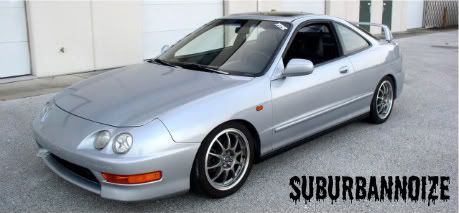
I really like these two pictures. Should I crop them bring them in a little closer on the car itself as thats the focal point of the picture? I dont really know how to, or even if you can, sharpen the image, or something like that.


I really like these two pictures. Should I crop them bring them in a little closer on the car itself as thats the focal point of the picture? I dont really know how to, or even if you can, sharpen the image, or something like that.

Registered User
Joined: Jan 2009
Posts: 37
Likes: 0
first off I would try to start with a better picture. I'm sure you you could take a better picture than one of your car just sitting in your driveway. Do you have any photo editing software?
Last edited by Sixbolt; May 20, 2009 at 06:34 AM.
Thread Starter
Cold Ass Honky
Joined: Aug 2007
Posts: 5,067
Likes: 0
Im still figuring out how to use Gimpshop. I just finished a few things on the car and snapped a few pics of it. Ill try to get a few better locations. Thanks.

Registered User
Joined: Feb 2007
Posts: 375
Likes: 0
youtube will be your bestbet.
Someone can only tell you so much after that its how creative you want to get.
I would suggest using photoshop for a few things, bounce it into lightroom.
All of the listed programs adobe does a 30 day free trial. I suggest you checking out some online tuts before downloading, then take some photos of your car and have fun.
Someone can only tell you so much after that its how creative you want to get.
I would suggest using photoshop for a few things, bounce it into lightroom.
All of the listed programs adobe does a 30 day free trial. I suggest you checking out some online tuts before downloading, then take some photos of your car and have fun.

Post Deleting Expert.
Joined: Nov 2006
Posts: 2,889
Likes: 0
Honestly, you will see greater improvements by finding a better location instead of trying to enhance in photoshop. Look through some car pictures and find an angle you like, then copy it with a better location. That should get you started. 
__________________


Digital Rican!!!
Joined: Aug 2008
Posts: 512
Likes: 0
Google, youtube are your best bet to find editing tutorials. Thats what we all have done to learn. Not trying to be rude but its along process to teach one to learn how to edit. All we can do is give suggestions.
And like the above have already sd. Get better location pictures. Show the charactor of you car not just a snap in your drive way.
Its frustrating in the beginning but trust me, if you have pataints, it gets easier
And like the above have already sd. Get better location pictures. Show the charactor of you car not just a snap in your drive way.
Its frustrating in the beginning but trust me, if you have pataints, it gets easier
__________________
Canon 7d * 28/135mm * 50mm 1.8 * 430exII * My Eyes * 16x16 Soft Box * Cacus v4 trigger * ABR800
http://www.flickr.com/photos/damnrican/
Canon 7d * 28/135mm * 50mm 1.8 * 430exII * My Eyes * 16x16 Soft Box * Cacus v4 trigger * ABR800
http://www.flickr.com/photos/damnrican/

Drinker of the Dew
Joined: Nov 2005
Posts: 1,041
Likes: 0
The first thing you want to do is get the best picture you can so you don't have to do too much editing.
Since your using a P&S (I'm assuming) try and get the composition you want from the camera so you don't have to crop anything, also Sixbolt was right about the location, just take it to an empty parking lot/garage or something. Make sure you have the camera set up to take the biggest, highest quality image it can and maybe do some exposure bracketing since you wont really be able to fix the exposre in post (unless your camera shoots raw).
As far as editing goes I would play with the contrast a bit, maybe some sharpening (very little), tweak the colors if you need. In the case of your sig I cropped, de-saturated the color, bumped the contrast, sharpened, balanced out the exposure as much as I could, then added a gradient map just for kicks and of course the text.
I use Paint.NET btw, which imo is much easier to use and learn on than GIMP. It might not have as many features but it has enough to get the job done.
Since your using a P&S (I'm assuming) try and get the composition you want from the camera so you don't have to crop anything, also Sixbolt was right about the location, just take it to an empty parking lot/garage or something. Make sure you have the camera set up to take the biggest, highest quality image it can and maybe do some exposure bracketing since you wont really be able to fix the exposre in post (unless your camera shoots raw).
As far as editing goes I would play with the contrast a bit, maybe some sharpening (very little), tweak the colors if you need. In the case of your sig I cropped, de-saturated the color, bumped the contrast, sharpened, balanced out the exposure as much as I could, then added a gradient map just for kicks and of course the text.
I use Paint.NET btw, which imo is much easier to use and learn on than GIMP. It might not have as many features but it has enough to get the job done.
__________________

"Thirty-six satisfactory exposures on a roll means a
photographer is not trying anything new." - Freeman Patterson
"Thirty-six satisfactory exposures on a roll means a
photographer is not trying anything new." - Freeman Patterson
Thread Starter
Cold Ass Honky
Joined: Aug 2007
Posts: 5,067
Likes: 0
Thank you guys. I will find better places to grab some shots. Jake2k, thats exactly what I was wondering, just the little things to tweak it, and make it a little more clear. Thanks. I will google and see what other angles make the cars look good.


