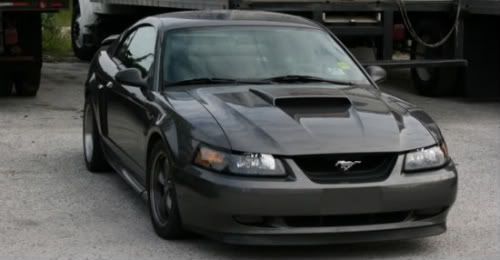
paint me on photoshop plz


Four Door Mafia
Joined: May 2006
Posts: 820
Likes: 0

Under photo filters you can select a color. If you move pointer to an area over the car it will turn into a dropper tool so you can select the color from there. Then you can use the slider on the menu to adjust how light or dark you want to shade the area with the color. If you want to change the actual color uncheck the box that says preserve luminescence. That will make the bumpers the same color as the car.
I used the polygon lasso tool to circle all the bumpers and copy them to their own layer. I then desaturated them and adjustd the levels to make them look better. After that I did the filter to change the color.
Hope that helps. If I didn't have stuff to do I would take screen shots and show you.
I used the polygon lasso tool to circle all the bumpers and copy them to their own layer. I then desaturated them and adjustd the levels to make them look better. After that I did the filter to change the color.
Hope that helps. If I didn't have stuff to do I would take screen shots and show you.
__________________
ECU Chipping, Tuning, Custom Wiring, and any other automotive needs. PM me for a quote.
Hmotors/Hondata/Hasport/JHPusa/PasswordJDM
stores. Most parts in stock or 1 day away!
ECU Chipping, Tuning, Custom Wiring, and any other automotive needs. PM me for a quote.
Hmotors/Hondata/Hasport/JHPusa/PasswordJDM
stores. Most parts in stock or 1 day away!

Nick
Joined: Jul 2006
Posts: 229
Likes: 0
thanks. i normally use the lasso tool and outline the thing i wanna change the color of. then desaturate it. and ise the color balance adjustment to get the right color. then use the curves adjustment to get it a better color. i like doing it that way. makes it look more realistic i think.