Borders - RebelGFX
Many of you have seen my photography, and I have a signature border. It is the only border I use because it really makes the photo 'pop'. It is very simple to add to any image and heres how to:
First, open the image you would like to add a border to. Duplicate the image (Click the Layer Menu and go to Duplicate Layer...), then delete the original background layer. You need to do this because the original layer is locked -- which means you cannot do anything to it.
Second, Go to Edit >> Stroke. A dialog box comes up like below. Apply the settings shown:
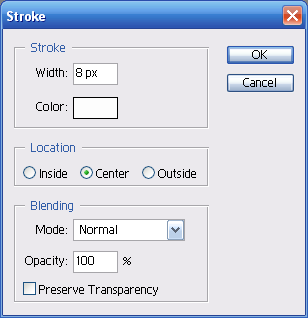 Click Ok
Third, Go to Edit >> Stroke once again. The dialog box will come back up, now apply these settings:
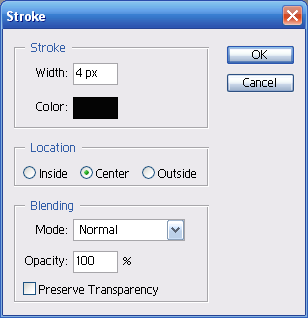
Click Ok
And voila! My signature border.