PDA

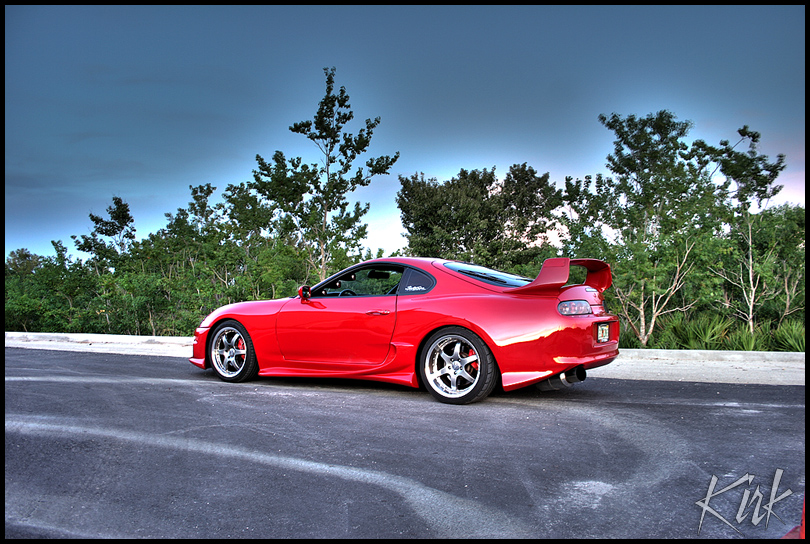
View Full Version : First HDR... lemme know, I know driveway pics FTL...


Kamikaze
09-28-2007, 01:22 PM
Here it is, first time trying this, some kid on another forum said since I'm not big into editing photos after I take them, try doing HDR shots. So here's one of the Gray Beast a.k.a. Gray Bucket a.k.a. Da Teg...

http://img.photobucket.com/albums/v138/LilDeion3/IntegraHDRPicture.jpg

Kamikaze
09-28-2007, 01:23 PM
Full size looks a lot better... but w/e this is the internet, you want the fullsize lemme know.

integraturbo
09-28-2007, 01:25 PM
bump

.:Chris:.
09-28-2007, 01:32 PM
I dunno, I'm just not digging it. I really like integra's in that grey color, but this doesn't do it justice.

If you get a chance, maybe try taking pics later in the day and avoid shooting the side of the car that's in the shade.

Rep.

oASHo
09-28-2007, 01:35 PM
plus one. try taking pics of the car not so close and try and catch the sky a bit better.

Kamikaze
09-28-2007, 01:38 PM
Alright, thanks for the advice, I'll try that next time maybe in a little bit...

oASHo
09-28-2007, 01:43 PM
http://i97.photobucket.com/albums/l234/snaild16/alansHDR.jpg
http://www.clubna-t.com/gallery/albums/userpics/10001/hdrsep%20006_1_2_3_4_51%20copy.jpg

theres 2 for example to help give you ideas. good luck

Kamikaze
09-28-2007, 02:01 PM
Uploaded the wrong one...

http://img.photobucket.com/albums/v138/LilDeion3/IntegraHDRPicture.jpg

CanTheWhales
09-28-2007, 04:28 PM
Sorry, but I think the second one looks worse. The sky keeps mixing with the grey... where's the original, I'd love to give it a shot?

Kamikaze
09-28-2007, 04:34 PM
Sure...

you want all three or what?

.:Chris:.
09-28-2007, 05:03 PM
Sure...

you want all three or what?

Post links to your original files and I'll take a crack at it too.

Ford DNA
09-28-2007, 10:34 PM
What is HDR?

TPNORTH
09-28-2007, 10:43 PM
i was wondering the same thing??? haha

Steve C.
09-28-2007, 10:53 PM
Its stands for High Dynamic Range, it basically takes an under exposed image and an over exposed image and merging them.Some photo editing programs have an HDR option which basically does it for you, and some people do it manually

Not the best example but you get the idea:

http://www.cambridgeincolour.com/graphics/workflow_dr_ex1a.jpghttp://www.cambridgeincolour.com/graphics/workflow_dr_ex1b.jpghttp://www.cambridgeincolour.com/graphics/workflow_dr_ex2b.jpg
(underexposed) (overexposed) (Final Image)

Steve C.
09-28-2007, 11:13 PM
Also, write up daredevil did on it!

HDR

In computer graphics and photography, high dynamic range(HDR) is a set of techniques that allow a far greater dynamic range of exposures (i.e. a large difference between light and dark areas) than normal digital imaging techniques. The intention of HDRI is to accurately represent the wide range of intensity levels found in real scenes ranging from direct sunlight to the deepest shadows.

HDR was originally developed for use with purely computer-generated images. Later, methods were developed to produce a HDR image from a set of photos taken with a range of exposures. With the rising popularity of digital cameras and easy to use desktop software, the term "HDR" is now popularly used to refer to the process of tone mapping together bracketed exposures of normal digital images, giving the end result a high, often exaggerated dynamic range; however, in this case neither the input nor the output qualify as "true" HDR.

Information stored in high dynamic range images usually corresponds to the physical values of luminance or radiance that can be observed in the real world. This is different from traditional digital images, which represent colors that should appear on a monitor or a paper print. Therefore, HDR image formats are often called "scene-referred", in contrast to traditional digital images, which are "device-referred" or "output-referred". Furthermore, traditional images are usually encoded for the human visual system (maximizing the visual information stored in the fixed number of bits), which is usually called "gamma encoding" or "gamma correction". The values stored for HDR images are often linear, which means that they represent relative or absolute values of radiance or luminance (gamma 1.0).

HDR images require a higher number of bits per color channel than traditional images, both because of the linear encoding and because they need to represent values from 10−4 to 108 (the range of visible luminance values) or more. 16-bit ("half precision") or 32-bit floating point numbers are often used to represent HDR pixels. However, when the appropriate transfer function is used, HDR pixels for some applications can be represented with as few as 10–12 bits for luminance and 8 bits for chrominance without introducing any visible quantization artifacts.

Ford DNA
09-30-2007, 12:32 AM
I like the abbreviated explanation better. I'm tired. LOL

Thanks for 'splaining.

japanbran
11-27-2007, 07:08 PM
can you do this with out an editing program?

.:Chris:.
11-27-2007, 07:19 PM
No.

See the photo techniques sticky for more info on HDR.

japanbran
11-28-2007, 01:26 AM
thank you sir!

jlude90
11-30-2007, 12:35 AM
the ones the OP posted look cartoonish, i lke the ones that look more real, not sure what makes them look that way though

skunkdSiR
12-02-2007, 01:56 AM
i think they look too much like a cartoon. try to keep it somewhat like the original pic but try to bring out both the shadow's and highlights..